

Plans and pricing
Your plan belongs to your organization, so everyone in it shares the same features and limits. You can build on the Free plan for as long as you like and upgrade when you need code access, app store publishing, or a custom domain.
To see your current plan and compare the others, select Billing > Plan in the sidebar. The page shows a card for each plan, a Compare plans table, and answers to common billing questions.
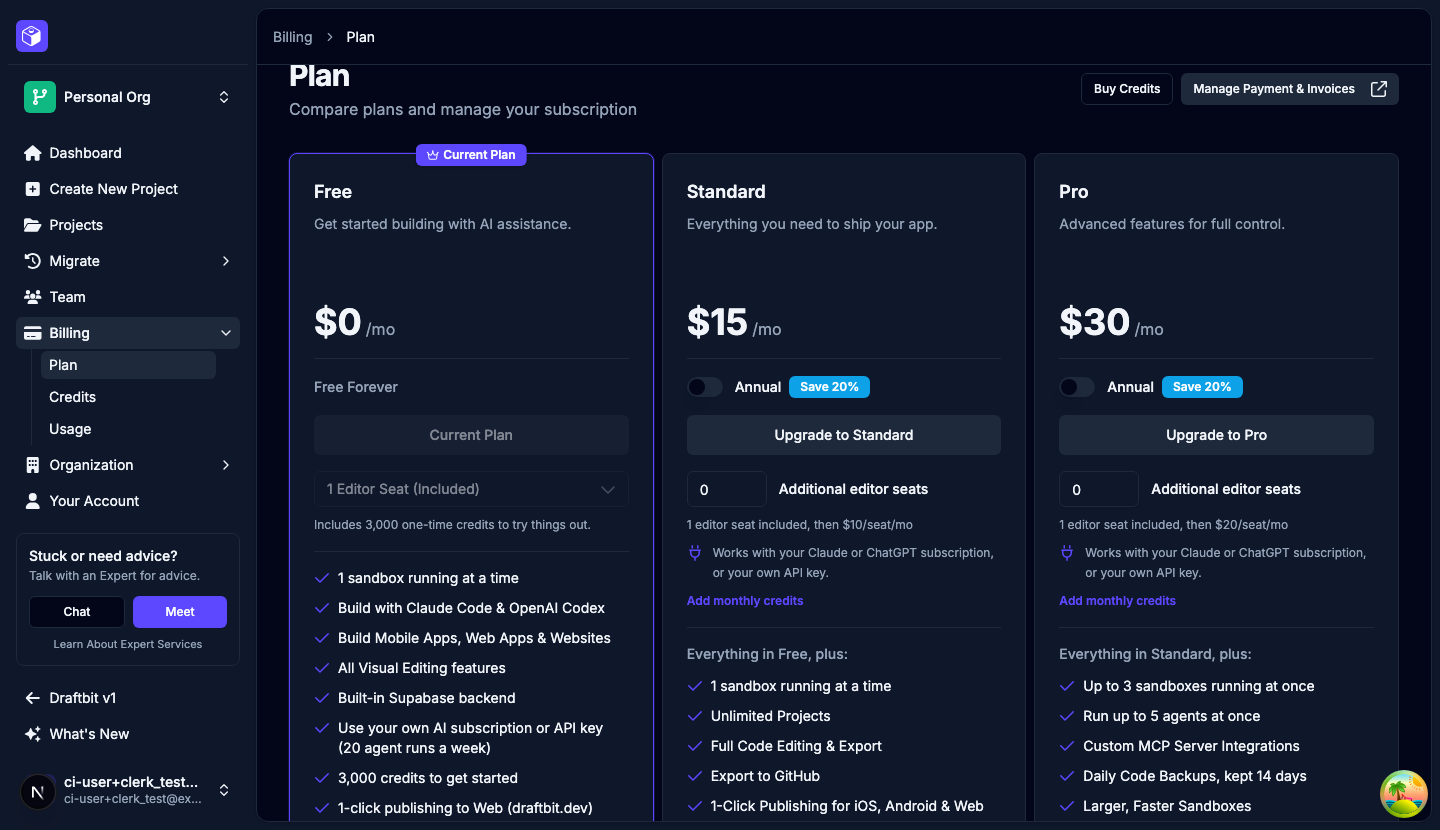
Prices
Section titled “Prices”| Plan | Monthly | Annual | Included editor seats | Additional seats |
|---|---|---|---|---|
| Free | $0 | $0 | 1 | Not available |
| Standard | $15 per month | $144 per year ($12 a month) | 1 | $10 per seat per month |
| Pro | $30 per month | $288 per year ($24 a month) | 1 | $20 per seat per month |
| Enterprise | Custom | Custom, billed annually | Unlimited | Not needed |
Annual billing costs 20% less than paying monthly, for the plan and for additional seats. With annual billing, an additional seat costs $8 a month on Standard and $16 on Pro. See Team and seats for how seats work.
Prices are in US dollars. Draftbit accepts Visa, Mastercard, and American Express, processed by Stripe. Enterprise customers can arrange invoice billing.
Credits and your own AI
Section titled “Credits and your own AI”Standard and Pro are base plans: their prices don’t include any credits. You have two ways to pay for the AI agent, and you can use both.
- Your own AI subscription or API key. On every plan, including Free, you can connect a Claude or ChatGPT subscription, or an OpenAI, Anthropic, or OpenRouter API key. Threads that use them don’t spend Draftbit credits. On Free, your own AI covers 20 agent runs a week. See Provider Keys and Weekly agent runs on Free.
- Draftbit credits. On the Standard or Pro card, select Add monthly credits and choose a credit package. Packages start at 5,000 credits for $5 a month and go up to 1,150,000 credits for $1,000 a month. Packages from $25 include bonus credits, and larger packages include more. With annual billing, you pay for the package’s year up front and get the whole year’s credits at the start of the term. If you’re on Free and use Draftbit credits rather than your own AI, the cards start with the 5,000-credit package already selected. Select Remove credits to go back to the base plan.
The Free plan comes with a one-time grant of 3,000 credits. It doesn’t renew. On Free, threads that use credits run Codex with OpenAI models other than GPT-6 Astra. Claude Code, GPT-6 Astra, and other models need Standard or above when they use credits, or your own subscription or API key on any plan.
Paid plans can also buy one-time credits with Buy Credits at the top of any Billing page. See Credits for how credits are spent and when they expire.
Weekly agent runs on Free
Section titled “Weekly agent runs on Free”On the Free plan, your organization can send 20 messages a week to the agent on your own AI subscription or API key. Each message you send counts as one agent run, including the first prompt that builds an app and every follow-up. Messages from everyone in the organization count toward the same 20. Publishing doesn’t count, and neither do threads that use Draftbit credits.
Your organization’s week starts when the organization was created and repeats every 7 days, so the reset happens on the same weekday and time each week. When you’ve used 12 or more runs, the chat panel shows how many you’ve used, when the count resets in your local time, and an Upgrade Plan button. At 20, new messages on your own AI won’t start until the reset, and Draftbit offers an upgrade. Messages waiting in a thread’s queue stay there, and you can resume the queue after the reset or after you upgrade. Standard, Pro, and Enterprise have no weekly limit.
What each plan includes
Section titled “What each plan includes”Every plan includes the AI agents with Claude Code and OpenAI Codex, the visual editor, mobile apps, web apps, and websites, the built-in Supabase backend, Tasks, and live collaboration.
| Feature | Free | Standard | Pro | Enterprise |
|---|---|---|---|---|
| Projects | 3 | Unlimited | Unlimited | Unlimited |
| Apps per project | 3 | 5 | 10 | Unlimited |
| Agents running at once | 1 | 1 | 5 | Unlimited |
| Projects open at once | 1 | 1 + 1 per added seat | 3 + 1 per added seat | Unlimited |
| Agents and models on Draftbit credits | Codex and supported OpenAI models | All supported | All supported | All supported |
| Your own AI subscription or API key | 20 agent runs a week | Unlimited | Unlimited | Unlimited |
| Code editing | No | Yes | Yes | Yes |
| Code export | No | Yes | Yes | Yes |
| GitHub Export | No | Yes | Yes | Yes |
| Custom MCP servers | No | No | Yes | Yes |
| Daily code backups | No | No | Kept 14 days | Kept 60 days |
| Web publishing | On draftbit.dev | Yes | Yes | Yes |
| Custom domains | No | Yes | Yes | Yes |
| iOS and Android publishing | No | Yes | Yes | Yes |
| iOS and Android simulators | No | No | Yes | Yes |
| Testing builds | No | No | Yes | Yes |
| Over-the-air updates | No | No | Yes | Yes |
| Native builds each month | No | 15 per seat | 30 per seat | Unlimited |
| App Store submission assistance | No | No | Yes | Yes |
| Support | Community | Community and email | Priority support and training | Dedicated success manager and custom SLAs |
Enterprise adds SSO and SAML sign-in, dedicated infrastructure, private and self-hosting options, custom integrations, custom credit allocations, and custom onboarding.
Free plan limits
Section titled “Free plan limits”- You can have up to 3 projects, with up to 3 apps in each. When you reach a limit, Draftbit asks you to upgrade before you create another.
- To read or change your app’s code yourself, or to download it, you need Standard or above.
- You can publish to the web on a
draftbit.devaddress. Custom domains and app store publishing need Standard or above.
The agent can still change any file in your app on the Free plan. The limit is on opening and exporting the code yourself.
Changing your plan
Section titled “Changing your plan”The Owner upgrades from the Free plan. Once you’re on a paid plan, the Owner or an Admin can change it.
- Select Billing > Plan in the sidebar.
- On the plan you want, turn on Annual if you’d like annual billing, and set Additional editor seats and a credit package if you need them.
- Select Upgrade to, Downgrade to, or Update Plan on that card.
- Coming from the Free plan, you finish checkout with Stripe. On a paid plan, Draftbit shows what changes and what’s due now. Select Upgrade Now or Confirm Change.
Upgrades apply right away. You pay a prorated amount, and your billing cycle restarts that day. Downgrades and cancellations take effect at the end of your current billing period, and you keep your current features until then.
While a change is scheduled, the Plan page shows a Pending Subscription Change banner, or Subscription Scheduled to Cancel if you’re moving to Free. Select Cancel Change or Keep Subscription to undo it. You can’t make another change until the scheduled one happens or you cancel it.
Select Manage Plan on your current plan, or Manage Payment & Invoices at the top of the page, to update your payment method and download invoices.
If you signed up under earlier pricing, the Plan page says Your current plan isn’t listed below and shows what you pay now. You keep that plan until you choose a different one. If your plan shows Managed by Draftbit, contact us to change it.
What happens when you downgrade
Section titled “What happens when you downgrade”Your projects and apps stay in your account and stay open. From the day the lower plan starts:
- You can’t create projects or apps beyond the new plan’s limits.
- Features above the plan, such as code export or app store publishing, lock until you upgrade again.
- Custom MCP servers stay in your list, but the agent stops using them. They show Not in your plan.
- Editors beyond the plan’s seats can view apps but not change them. See More editors than seats.
- Custom domains keep working for 30 days, then they’re disconnected. See If your plan changes.
- New backups stop below Pro. Backups you already have stay until they expire, and on Free you can’t download them. See Backups.
- Testing builds you already made can’t be downloaded until you upgrade again.
- You can’t send new over-the-air updates, and new store builds are published without them. Apps already in the stores keep the last update you sent. See Over-the-Air Updates.
Your credits stay in your account until they expire.
Enterprise
Section titled “Enterprise”Enterprise is for organizations that need unlimited seats, agents, and open projects, longer backup retention, SSO, or their own infrastructure. Pricing is annual and set for your organization.
To talk to us about it, select Billing > Plan, then Explore Enterprise. Select Book a meeting to pick a time, or Contact Sales to send us a message.